Online Training On SharePoint
                      

Sunday, 31 March 2013

SharePoint 2013 Trial Subscription

Do you want to try the New SharePoint 2013. Microsoft has made it really easy. In fact with this you can try all the new features in Office 365.

Here are the simple steps:

1. Navigate to the URL http://office.microsoft.com/en-us/business/office-365-for-enterprise-document-sharing-FX103030346.aspx

2. Click on Try now:

3. It will give you a registration page where you need to provide few details.

4. Once it is registered successfully, few of the services will be provisioned such as Exchange, Identity Service, Lync, Right Management Service, SharePoint etc.


5. Once all this provisioned successfully, Under Admin menu, a menu item will come for SharePoint:

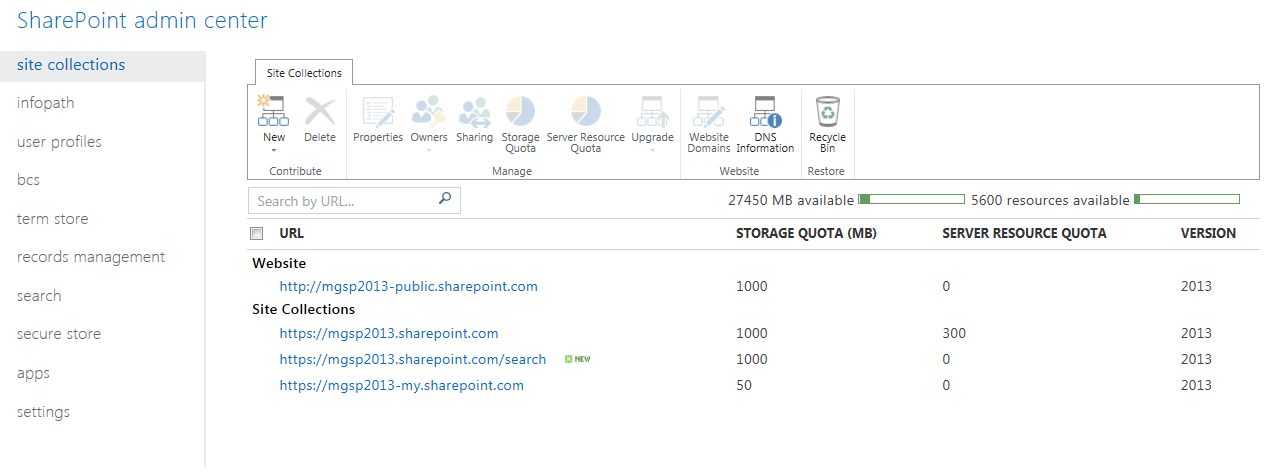
6. Click on SharePoint link and you are done :). You will see a page where few of the sites are provisioned to do few trials on new features:


Friday, 29 March 2013

Custom Help with SharePoint OOB Features for Business Applications

While working for a SharePoint application, there was a requirement to create a custom help for the application. After some digging, I realised that SharePoint has excellent in built capabilities where we can create specific help for any application and host it in SharePoint. This does not need any coding and just require to enable a feature and then few other steps to configure the same.

Here are steps to create custom help in SharePoint:

1. Enable the Custom Site Collection Help Feature:


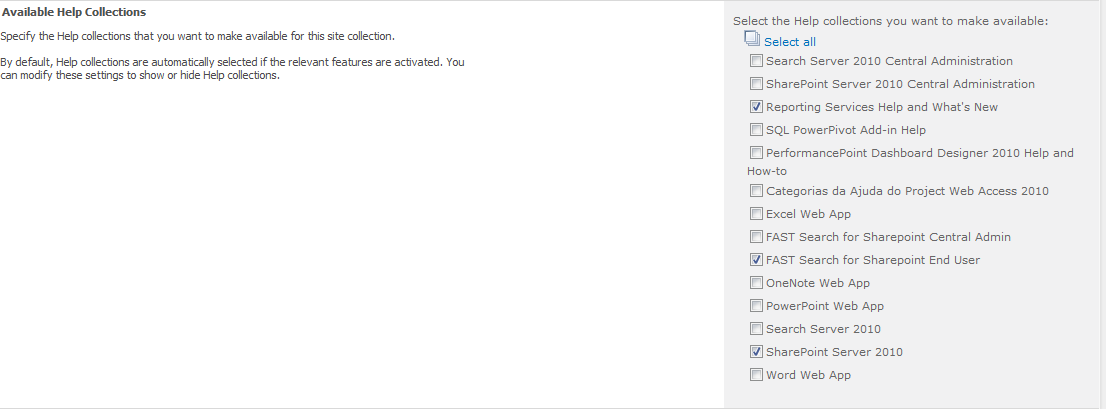
2. Once we do this, a new link appears in the Site Collection setting page under Site Collection Setting with the name Help Settings. This allows a user to select what help collections are available when a user click on the help button:


3. Based on our selection in the previous step the help collection appear when a user click on the help icon in any site or any page.

4. Now the best part of this is that adding our custom help in this is very easy. I will put few steps for the same. When we enable the feature given in Step 1, it also create a special document library with the name 'Site Collection Help'.

5. This library allows to create 4 type of artefacts depending on the content types added in the document library by default :


6. Here we need to create the artefacts in a specific order. The Help Collection is top container which has got Help Categories  which are linked to Help Topics (Pages or Documents etc.). We will first create a Help Collection, Few Help Categories and then create Help Topics.

7. I created a Help Collection with the name SharePoint Demo Help. Then created 2 help Categories with the names Help 1 and Help 2. Also inside Help 1, added 2 Help Topics material which were nothing but 2 pdf files.

8. Now we will add this Help Collection. To Do this go to Help Settings:
Now I removed all other help collections and just the one which I created.

9. Now go to any help page. It will look like the below:


The Help 1 & Help 2 are the 2 Help categories which we created in the previous step.

10. Click the Help 1 link and it will show the help topics which we have put inside the Help 1 Categories.

So with the few steps as above it is very simple to create our own specific help for a particular SharePoint Application and host it inside.

Hope it helps!!!

Thursday, 28 March 2013

Deploying Service Applications with Configuration Wizards V/S PowerShell

Service Application can either be deployed using the Configuration Wizard or through using Power Shell. The configuration wizard gives an easy option and creates all the service apps without any user intervention. This is done with default setting so these are generally with not proper standards. The service apps can also be created using PowerShell which takes some efforts but give lot of flexibility.

The below table describe some of the advantages which we have while creating the Service Apps using PowerShell. This will also help you to decide when to use PowerShell or Configuration Wizard for deploying the Serivces:


Deploying service applications by using the Initial Configuration Wizard
Deploying service applications manually or by using Windows PowerShell
Application Pool
All service applications are deployed to the same application pool which is not a good thing in a big farm.
We can deploy service applications to dedicated application pools, if desired.
Service Accounts
The same account is used for all services. We can edit service accounts later.
We can apply different service accounts to service applications at the time of creation.
Databases
Database names are automatically generated, including GUIDs that are long and difficult to remember.
We can assign database names and implement a naming convention.
Service Application Settings
Default settings are applied to service applications. We can change these later.
We can implement custom settings when the service application is deployed.

Saturday, 23 March 2013

Presentations on SharePoint 2013

Here is a good collection of Power Point presentations (Slide Decks) on various features of SharePoint 2013:

1. Introduction to SharePoint 2013: This presentation describes the SharePoint 2013 from high level and describes the various new features in new SharePoint.
Download it from: http://download.microsoft.com/download/7/7/3/773CA2C2-579B-408C-808E-A6F561194E20/Ig15_SP_IT_M01V1_introduction.pptx

2. Requirements for SharePoint 2013: This presentation describes the Hardware and Software requirements for SharePoint 2013. This also covers the browser support for new version of SharePoint along with set-up and deployment considerations.
Download it from: http://download.microsoft.com/download/7/7/3/773CA2C2-579B-408C-808E-A6F561194E20/Ig15_SP_IT_M02V1_requirements.pptx

3. Request Management in SharePoint 2013: This presentation  describes the Request Management feature in SharePoint 2013. Request Management feature allows to control the incoming requests to SharePoint and route it to the appropriate servers.
Download it from: http://download.microsoft.com/download/7/7/3/773CA2C2-579B-408C-808E-A6F561194E20/Ig15_SP_IT_M03V1_requestmgmt.pptx

4. Analytics Platform in  SharePoint 2013: The Analytics Platform replaces the Web Analytics service application in SharePoint 2013. The presentation describes the new Analytics service in details.

5. Distributed Cache Services in  SharePoint 2013: There is a new distributed cache service in SharePoint 2013, based on Windows Server AppFabric Distributed Caching. This service is used in features like authentication token caching and My Site social feeds. The presentation describes the new Distributed Cache service in details.

6. Alternative Service Mapping and Self Service Site Creation: The self service site creation has been updated in SharePoint 2013. The following decks describes these changes along the changes in the Alternate Access Mapping.

7. Themes in SharePoint 2013: The themes engine in SharePoing has been revamped and everything is based on HTML instead of a proprietary format.
Download it from: http://download.microsoft.com/download/7/7/3/773CA2C2-579B-408C-808E-A6F561194E20/Ig15_SP_IT_M04V3_themes.pptx

8. Sharing in SharePoint 2013: The ways people can request access on a SharePoint site and how these access can be granted are simplified and improved significantly to solve few long standing problems. Below presentation helps to understand the changes done in this area.
Download it from: http://download.microsoft.com/download/7/7/3/773CA2C2-579B-408C-808E-A6F561194E20/Ig15_SP_IT_M04V4_sharing.pptx

9. Office Web Applications: Learn about the Office Web Apps introduced in SharePoint 2013.
Download it from: http://download.microsoft.com/download/7/7/3/773CA2C2-579B-408C-808E-A6F561194E20/Ig15_SP_IT_M05V1_intro.pptx

10. Deploying Office Web Applications: Presentation showing the requirements for Office Web Apps and different topologies. It also explains how these services can be scaled up.
Download it from: http://download.microsoft.com/download/7/7/3/773CA2C2-579B-408C-808E-A6F561194E20/Ig15_SP_IT_M05V2_deploy.pptx


11. Deploying Office Web Applications: Presentation showing how the Office Web Applications can be managed including patching.
Download it from: http://download.microsoft.com/download/7/7/3/773CA2C2-579B-408C-808E-A6F561194E20/Ig15_SP_IT_M05V3_operations.pptx

12. Service Applications in SharePoint 2013: The Service application model which was introduced in SharePoint 2010 is further enhanced in SharePoint 2013 and few new services have been introduced. A deck describing the various service applications in SP2013:
Download it from: http://download.microsoft.com/download/7/7/3/773CA2C2-579B-408C-808E-A6F561194E20/Ig15_SP_IT_M06V01_serviceapps.pptx

13. Access Service Application in SharePoint 2013: Learn about the Access Service Application with the deck.
Download it from: http://download.microsoft.com/download/7/7/3/773CA2C2-579B-408C-808E-A6F561194E20/Ig15_SP_IT_M06V02_accesssrv.pptx

14. App Management Service Application: SharePoint 2013 has introduced the apps model. As part of that a new Service Applicaiton has been introduced which manages all the apps installed in the farm. This service is accessed every time there is any interaction with the apps.
Download it from: http://download.microsoft.com/download/7/7/3/773CA2C2-579B-408C-808E-A6F561194E20/Ig15_SP_IT_M06V03_appmgmt.pptx

15. Business Connectivity Service in SharePoint 2013: Significant changes have been introduced in the BCS Service. This service now provides alerts for the external lists. External list have been enhanced for performance improvements, Data Source Filtering, Sorting & now allow Export to Excel. Read more in the presentation.

16. Excel Service in SharePoint 2013: Read more about the changes done in the Excel Services.

17. User Profile Service in SharePoint 2013: User Profile Services has been worked to improve the performance. Changes are described in the deck.

18.  Machine Translation Service in SharePoint 2013: A new service has been introduced in SP2013 to provide built-in translation capabilities on the SharePoint platform. This service utilize the cloud based translation services.

19.  Performance Point Service in SharePoint 2013: Learn about the changes in the Performance Point Services in SharePoint 2013.

20.  Visio Services in SharePoint 2013: Learn about the changes in the Visio Services in SharePoint 2013.


21.  Work Management Service in SharePoint 2013: A new service is introduced in SP2013 which helps to consolidates tasks for a user from multiple various applications and display them in Sharepoint. These various apps can be Project Server, Exchange Server other SharePoint Farms etc. This service does not have any configuration option from Central Administration.

22.  Word Automation Service in SharePoint 2013: Word Automation Service has been enhanced from SP 2010 to covert files immediately. Also now for this the file does not need to be stored in SharePoint.
Download it from: http://download.microsoft.com/download/7/7/3/773CA2C2-579B-408C-808E-A6F561194E20/Ig15_SP_IT_M06V11_wordautomation.pptx

23.  Word Automation Service in SharePoint 2013: Word Automation Service has been enhanced from SP 2010 to covert files immediately. Also now for this the file does not need to be stored in SharePoint.
Download it from: http://download.microsoft.com/download/7/7/3/773CA2C2-579B-408C-808E-A6F561194E20/Ig15_SP_IT_M06V11_wordautomation.pptx

24.  Enterprise Search – Architecture and Topology: The slide deck describes the search architecture in SharePoint 2013 and various components associated with it. Read it in more details with the deck.
Download it from: http://download.microsoft.com/download/7/7/3/773CA2C2-579B-408C-808E-A6F561194E20/Ig15_SP_IT_M07V1_archtopology.pptx

25.  Enterprise Search - Crawl and Content Configuration: The slide deck describes the connectors, content sources and other various components. Now SharePoint supports continuous crawling which enables to surface newly published documents into the search results almost instantaneously.
Download it from: http://download.microsoft.com/download/7/7/3/773CA2C2-579B-408C-808E-A6F561194E20/Ig15_SP_IT_M07V2_crawl.pptx

26.  Enterprise Search - Query Configuration: The slide deck describes the ranking, query rules and how to implement the same.
Download it from: http://download.microsoft.com/download/7/7/3/773CA2C2-579B-408C-808E-A6F561194E20/Ig15_SP_IT_M07V3_query.pptx

27.  Enterprise Search - New Search Results Display Options: The slide deck describes some of the cool changes done in search results display. Now we can define Results Type which is a combination of Rules, Property List and Display Template. The query suggestion has also been revamped and now these are  also consider the current users browsing history and activities on SharePoint site. Read more in the slide pack.
Download it from: http://download.microsoft.com/download/7/7/3/773CA2C2-579B-408C-808E-A6F561194E20/Ig15_SP_IT_M07V4_searchinterface.pptx

28.  Social Features in SharePoint 2013: Social features has got big face lift in SharePoint 2013. Now we can follow people as well as the content (documents, sites, tags). Read more at:
Download it from: http://download.microsoft.com/download/7/7/3/773CA2C2-579B-408C-808E-A6F561194E20/Ig15_SP_IT_M08V1_intro.pptx

29.  Community Sites in SharePoint 2013: Communities is a new feature which can be created by using a new Site Definition. This is available as a Site Template to all the site collections and sites. It is basically a SharePoint feature which can also be activated on any site. Really powerful to create very cool interactive site OOB. Read more to get idea about this new thing in SharePoint.
Download it from: http://download.microsoft.com/download/7/7/3/773CA2C2-579B-408C-808E-A6F561194E20/Ig15_SP_IT_M08V2_community.pptx

30.  My Site – Architecture and Administration in SharePoint 2013: Learn about the changes done in the My Site Infrastructure.
Download it from: http://download.microsoft.com/download/7/7/3/773CA2C2-579B-408C-808E-A6F561194E20/Ig15_SP_IT_M08V3_mysitearch.pptx

31.  My Site Feed in SharePoint 2013: Learn about Microbloging Feeds, Group Conversations and Like Features in SharePoint 2013.
Download it from: http://download.microsoft.com/download/7/7/3/773CA2C2-579B-408C-808E-A6F561194E20/Ig15_SP_IT_M08V4_mysitefeed.pptx

32.  Following in SharePoint 2013: With SharePoint 2013 people can follow other people, Sites, Documents & Tags. Read more abt this in the below deck.
Download it from: http://download.microsoft.com/download/7/7/3/773CA2C2-579B-408C-808E-A6F561194E20/Ig15_SP_IT_M08V5_mysitefollow.pptx

33.  My Documents in SharePoint 2013: Now on My Site you can have a consolidated list of all your docs.
Download it from: http://download.microsoft.com/download/7/7/3/773CA2C2-579B-408C-808E-A6F561194E20/Ig15_SP_IT_M08V6_mylib.pptx

34.  My Tasks in SharePoint 2013: My Tasks provides the ability to have a single, aggregated, view of all user tasks across SharePoint Sites, Project Sites and Exchange. This is done by using a new Service Application called Work Management. Read more with the presentation.
Download it from: http://download.microsoft.com/download/7/7/3/773CA2C2-579B-408C-808E-A6F561194E20/Ig15_SP_IT_M08V7_mytasks.pptx


35.  New Features in ECM in SharePoint 2013: Microsoft has improved the eDiscovery capabilities significantly along with some new cool features in Document Sets. Now the Document Sets can be downloaded  Read more with the presentation.
Download it from: http://download.microsoft.com/download/7/7/3/773CA2C2-579B-408C-808E-A6F561194E20/Ig15_SP_IT_M09V1_ecm.pptx


36.  New Features in WCM in SharePoint 2013: Some new cool things like Content By Search Web Part, much easier URL to remember along with improvement on Images and videos are few of the things.
Download it from: http://download.microsoft.com/download/7/7/3/773CA2C2-579B-408C-808E-A6F561194E20/Ig15_SP_IT_M09V2_wcm.pptx

Monday, 18 March 2013

Learning Roadmap for SharePoint 2013

Microsoft has published few roadmap to learn SharePoint 2013. I found these quite helpful so sharing the same:

1. Authentication in SharePoint 2013: Use this learning roadmap to build expertise about authentication in SharePoint 2013.

http://technet.microsoft.com/en-US/library/jj937859.aspx

2.  Upgrade to SharePoint 2013: Use this learning roadmap to build expertise about how to upgrade to SharePoint 2013.

http://technet.microsoft.com/en-US/library/jj937862.aspx

3. Virtualization with SharePoint 2013: Use this learning roadmap to build expertise about how to install and configure SharePoint 2013 in a Microsoft virtual environment.

http://technet.microsoft.com/en-US/library/jj984305.aspx

4. Powershell with SharePoint 2013: Use this learning roadmap to understand Windows PowerShell for SharePoint 2013.

http://technet.microsoft.com/en-US/library/jj937863.aspx

5. User Profiles in SharePoint 2013: Use this learning roadmap to gain expertise about user profiles and associated technologies in SharePoint Server 2013.

http://technet.microsoft.com/en-US/library/dn144878.aspx

Sunday, 17 March 2013

Creating Lists using Import Spreadsheet Template

Creating a SharePoint list is a very easy task for IT users but sometime this is not the case with business users. Business Users need to understand the creation of list and creation of multiple columns with correct types. This can be sometime onerous to them.

There is another easy way of creation of list with the data already available in excel. This eases the creation of list and columns manually. SharePoint automatically creates the list, various columns and the data in the list.

To do this, we need to select the Import Spreadsheet option:


This will open details page where the user needs to browse the excel sheet which needs to be imported:

With this SharePoint creates a list and give the option to select the data from the list:


Once the user imports the data list is created with all the columns and the data inserted into the list.

Advantages:
1. Creates the list and columns without no manual interventions.

Disadvantages: 
1. Sometime SharePoint is not able to identify the column type properly.
2. It will throw errors if the excel is complicated!!!

Hope SharePoint end users find it useful.... 

Saturday, 9 March 2013

Mapping of SharePoint 2010 functionalities with various SharePoint versions

We know that there are three different versions of SharePoint 2010. They are:

1. SharePoint Foundation
2. SharePoint 2010 Standard
3. SharePoint 2010 Enterprise

There are lot of articles which helps to identify the features at high level which are available in these different versions. Below comparison can help to identify the specific functionality which are available in these various versions. Hope this helps you to identify the correct version of SharePoint 2010 product.

1. SharePoint 2010 Foundation:
• Accessibility
• Blogs
• Browser-based Customizations
• Business Connectivity Services
• Business Data Connectivity Service
• Claims-Based Authentication
• Client Object Model (OM)
• Configuration Wizards
• Connections to Microsoft Office Clients
• Connections to Office Communication Server and Exchange
• Cross-Browser Support
• Developer Dashboard
• Discussions
• Event Receivers
• External Data Column
• External Lists
• High-Availability Architecture
• Improved Backup and Restore
• Improved Setup and Configuration
• Language Integrated Query (LINQ) for SharePoint
• Large List Scalability and Management
• Managed Accounts
• Mobile Connectivity
• Multilingual User Interface
• Multi-Tenancy
• Out-of-the-Box Web Parts
• Patch Management
• Permissions Management
• Photos and Presence
• Quota Templates
• Read-Only Database Support
• Remote Blob Storage (SQL Feature)
• REST and ATOM Data Feeds
• Ribbon and Dialog Framework
• Sandboxed Solutions
• SharePoint Designer
• SharePoint Health Analyzer
• SharePoint Lists
• SharePoint Ribbon
• SharePoint Service Architecture
• SharePoint Timer Jobs
• SharePoint Workspace
• Silverlight Web Part
• Site Search
• Solution Packages
• Streamlined Central Administration
• Support for Office Web Apps
• Unattached Content Database Recovery
• Usage Reporting and Logging
• Visual Studio 2010 SharePoint Developer Tools
• Visual Upgrade
• Web Parts
• Wikis
• Windows 7 Support
• Windows PowerShell Support
• Workflow
• Workflow Models

2. SharePoint 2010 Standard Version: All the above from the Foundation version with addition to the following:
• Ask Me About
• Audience Targeting
• Basic Sorting
• Best Bets
• Business Connectivity Services Profile Page
• Click Through Relevancy
• Colleague Suggestions
• Colleagues Network
• Compliance Everywhere
• Content Organizer
• Document Sets
• Duplicate Detection
• Enterprise Scale Search
• Enterprise Wikis
• Federated Search
• Improved Governance
• Keyword Suggestions
• Managed Metadata Service
• Memberships
• Metadata-driven Navigation
• Metadata-driven Refinement
• Mobile Search Experience
• Multistage Disposition
• My Content
• My Newsfeed
• My Profile
• Note Board
• Organization Browser
• People and Expertise Search
• Phonetic and Nickname Search
• Query Suggestions, "Did You Mean?", and Related Queries
• Ratings
• Recent Activities
• Recently Authored Content
• Relevancy Tuning
• Rich Media Management
• Search Scopes
• Secure Store Service
• Shared Content Types
• SharePoint 2010 Search Connector Framework
• Status Updates
• Tag Clouds
• Tag Profiles
• Tags
• Tags and Notes Tool
• Unique Document IDs
• Web Analytics
• Windows 7 Search
• Word Automation Services
• Workflow Templates

3. SharePoint 2010 Enterprise Version: All the above from the Standard version with addition to the following:
• Access Services
• Advanced Content Processing
• Advanced Sorting
• Business Data Integration with the Office Client
• Business Data Web Parts
• Business Intelligence Center
• Calculated KPIs
• Chart Web Parts
• Contextual Search
• Dashboards
• Data Connection Library
• Decomposition Tree
• Deep Refinement
• Excel Services
• Excel Services and PowerPivot for SharePoint
• Extensible Search Platform
• Extreme Scale Search
• InfoPath Forms Services
• PerformancePoint Services
• Rich Web Indexing
• Similar Results
• Thumbnails and Previews
• Tunable Relevance with Multiple Rank Profiles
• Visio Services
• Visual Best Bets
Related Posts with Thumbnails